by Dr. Amir Sahraei
Share
by Dr. Amir Sahraei
Building a RAG Pipeline on Databricks: From Raw Data to Intelligent Answers
A practical guide to Retrieval-Augmented Generation — from vector stores and embeddings to LLM integration, all within the Databricks Lakehouse.
Large Language Models are powerful, but they do not know your data. They were trained on public internet text, not your internal documentation, your product catalogue, or your enterprise knowledge base. This is exactly the problem that Retrieval-Augmented Generation (RAG) solves.
RAG is a design pattern that connects an LLM to a search system over your own data. Instead of relying purely on what a model has memorised, you retrieve relevant context at query time and inject it into the prompt.
The result is an AI system that gives accurate, grounded, up-to-date answers based on your specific knowledge.
Databricks is one of the most complete platforms for building production RAG pipelines — combining data ingestion, embedding generation, vector search, LLM serving, and governance all in one place.
This post walks you through the full architecture and each stage of the pipeline.
What Is RAG and Why Does It Matter?
Standard LLMs suffer from two key limitations:
- Their knowledge is frozen at training time
- They have no access to private or proprietary data
RAG addresses both by splitting the problem into two phases.
Retrieval phase: A user query is converted into a vector embedding and used to search a knowledge base.
Generation phase: Retrieved documents are passed into the LLM to construct a grounded answer.

The power of RAG lies in its flexibility:
- You can update your knowledge base without retraining
- You can scope answers to specific documents
- You can trace answers back to sources (critical for enterprise use cases)
Why Build RAG on Databricks?
Databricks provides a unified platform that covers every component a RAG system needs.
Instead of stitching together multiple tools, everything lives inside the Lakehouse:
- Delta Lake: Stores documents with ACID + versioning
- Mosaic AI Vector Search: Managed vector index
- Model Serving: Embeddings + LLM endpoints
- Unity Catalog: Governance & access control
- MLflow: Tracking, evaluation, lifecycle
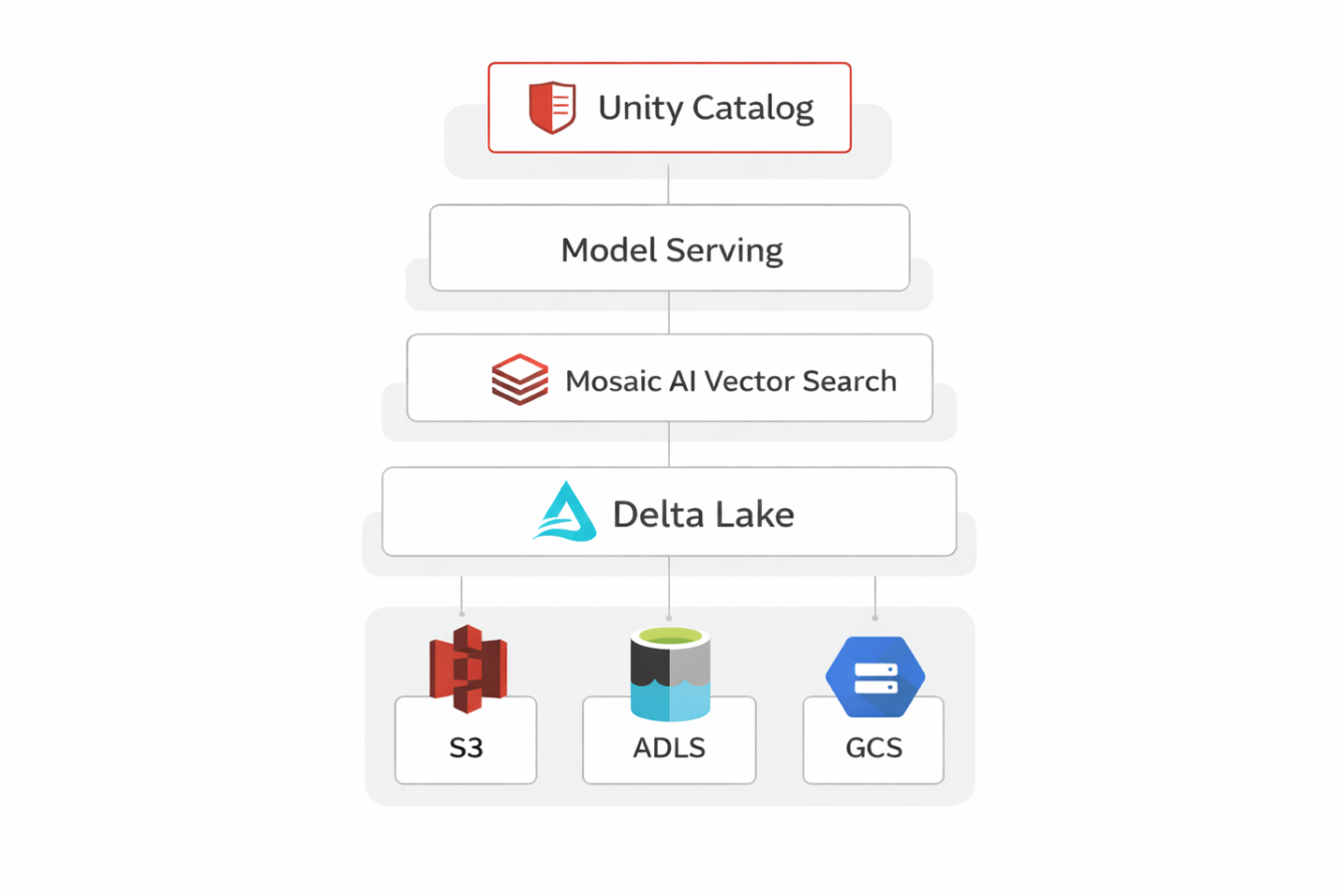
This dramatically reduces time-to-production and keeps everything inside a governed environment.
The RAG Pipeline Step by Step
Step 1: Data Ingestion and Preparation
Your pipeline starts with raw data: PDFs, HTML, Confluence, internal docs.
Using Databricks Auto Loader, you can stream new files into Delta Lake.
Then you chunk documents into smaller pieces.
Best practice:
- ~512 tokens per chunk
- ~50 token overlap
Smaller chunks → better retrieval
Larger chunks → more context
Step 2: Generating Embeddings
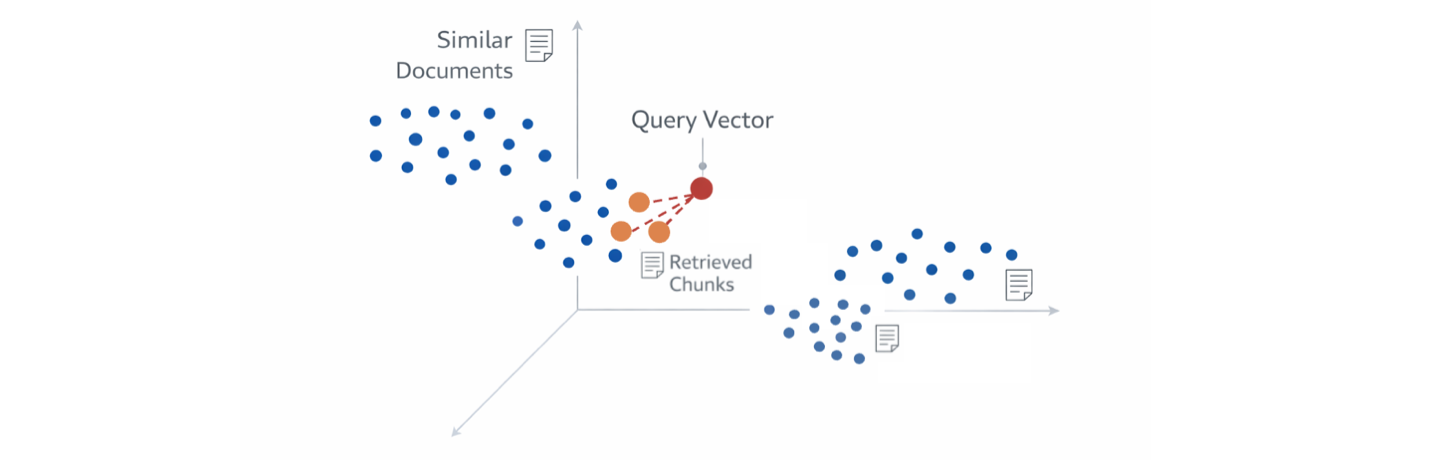
Each chunk is converted into a vector embedding — a numeric representation of meaning.
On Databricks, you can:
- Use Foundation Model APIs
- Deploy your own embedding model
- Parallelize with Spark / pandas UDFs
Important: similar content → similar vectors.
Step 3: Building the Vector Index
Mosaic AI Vector Search creates a managed index directly on Delta tables.
No external vector DB required.
Supports:
- Exact search
- Approximate search (ANN, HNSW)
Step 4: Retrieval at Query Time
User query → embedding → vector search.
Returns top-k chunks (typically 3–10).
You can enhance retrieval with:
- Metadata filters
- Hybrid search (vector + filters)
Step 5: Prompt Construction and Generation
The retrieved chunks are injected into the prompt.
Typical structure:
- System instruction
- Retrieved context
- User question
Then sent to an LLM (e.g. Llama 3, DBRX, Mixtral, GPT).
Important tip:
Always instruct the model to only answer based on context.
Governance and Observability
A production RAG system needs more than functionality.
- Unity Catalog: Access control + lineage
- MLflow Tracing: Logs queries, prompts, responses
This enables:
- Auditability
- Evaluation
- Debugging
Common Pitfalls to Avoid
- Poor chunking: Too small → no context, too large → bad retrieval
- Embedding mismatch: Always use same model
- No re-ranking: Improves retrieval quality
- Outdated index: Ensure incremental updates
- No evaluation: You cannot improve what you don’t measure
Final Thoughts
RAG is not just a technique — it is an architecture.
It combines:
- Data engineering
- Information retrieval
- Prompt engineering
- LLM serving
Databricks brings all of this together into one scalable platform.
Best way to start:
- Pick one dataset
- Ingest into Delta
- Build vector index
- Connect LLM
Once you see your first grounded answer — everything clicks.